This article reflects Snow Technology’s opinion and experience. It is general information, not legal, tax or HR advice. For advice on your own situation, speak to a qualified adviser or see the Data Protection Commission’s guidance at dataprotection.ie.
Short answer: When staff push back on clocking in from their phone, it’s usually for one of a few reasons: they’re worried about being tracked, they don’t know what data is collected, they don’t want to use their own device, or they fear the data will be used against them. In our view, the best response is to collect only what you need, explain it clearly before launch, offer an alternative to using a personal phone, and promise, in writing, that clocking data is used only for recording working time. Staff generally accept mobile clocking when it’s clearly limited and explained openly. Understanding Employee Concerns About the employee clocking system is crucial for a successful implementation.
Why these concerns are reasonable
It’s tempting to treat pushback on mobile clocking as resistance to change. We think that’s a mistake. Many of the concerns employees raise reflect real issues that Irish data protection guidance takes seriously.
Location data is particularly sensitive because it can reveal patterns of behaviour, private life, and movements outside working hours. The Data Protection Commission also notes that employees have a reasonable expectation of privacy at work.
Irish employees also tend to raise privacy concerns more readily than employees elsewhere. One company operating in both Ireland and the UK reported that 15% of Irish staff opted out of its biometric attendance system, compared with just 1% in the UK. In our experience, a rollout that works in one market won’t always land the same way here.
Here are the concerns we hear most often, and how we’d respond to each.
It is important to acknowledge and address Employee Concerns About Clocking to ensure a smooth transition to mobile clocking solutions.
Addressing Employee Concerns About Clocking is essential for fostering a positive workplace environment and ensuring compliance with data protection regulations.
“Will you be tracking me all day?”
This is almost always the first question, and it deserves a clear answer.
What we’d recommend: Set up the app to check location only at the moment of clocking in and out, and say so explicitly. There’s a big difference between confirming someone started their shift at the right site and following them around all day. For teams moving between locations, our guide to clocking in across multiple sites explains the recording challenges to consider.
Irish guidance supports this approach. Commentators writing in the Law Society Gazette note that tracking someone’s precise location throughout the day when a simple check-in would do is unlikely to be considered necessary, and that monitoring staff during breaks, commutes or personal time is almost certainly unlawful. The DPC also says vehicle tracking shouldn’t be used for general monitoring of staff. In our view, the same thinking applies to phones.
What to tell staff: “The app checks your location only when you tap to clock in or out. It doesn’t track you during your shift, on your break, or when you’re not working.”
“What data are you collecting, and who can see it?”
Vague answers make people suspicious. Specific ones reassure them.
What we’d recommend: Put it in writing before launch. Irish legal commentary emphasises that employees should be told clearly what data is collected, why, how long it’s kept, and who has access to it.
In practice, that means a short, plain-English notice covering:
- What’s collected. Clock-in and clock-out times, and location at those moments only.
- Why. To record working time and pay people correctly.
- How long it’s kept. Your retention period.
- Who can see it. For example, your line manager and payroll.
“Why should I use my own phone?”
Some staff don’t want work apps on their personal device. Others have limited data allowances, older phones, or no smartphone at all. These are fair points.
What we’d recommend: Don’t make a personal phone the only way to clock in. Offer an alternative, such as a shared tablet or terminal on site, and make it clear that choosing it has no downside. This matters for legal as well as practical reasons. Consent is rarely valid in an employment context because of the imbalance of power, so “they agreed to install it” isn’t a strong foundation to rely on.
It also helps to explain what the app can and can’t access on the phone, and to confirm it doesn’t need to run in the background.
“Will this be used against me?”
Staff sometimes worry that clocking data will become evidence in a disciplinary process about something unrelated.
What we’d recommend: Commit in your policy that clocking data is used for recording working time and pay, and not for other purposes. Irish decisions support this. In Doolin v Data Protection Commissioner, the Court of Appeal held that CCTV installed for security couldn’t lawfully be reused for disciplinary action, and commentators note that the same principle applies to location data. The DPC’s workplace guidance makes a similar point about car park and building access data collected for security being reused to verify attendance.
What to tell staff: “Clocking data is used to record your hours and pay you correctly. It’s not used for anything else.”
Snow Time & Attendance
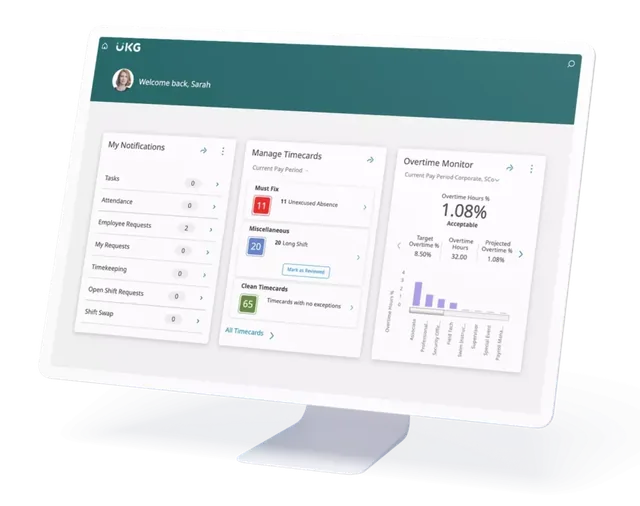
Snow puts scheduling, clock-ins and absence in one live view, so you see overtime before it hits payroll.
“Will I get work notifications when I’m off?”
Once a work app is on a personal phone, some people worry that work will follow them home.
What we’d recommend: Switch off non-essential notifications outside rostered hours, and don’t use the app to contact people about work when they’re off shift unless it’s genuinely necessary. The WRC’s Code of Practice on the Right to Disconnect is worth reading here. In our view, the aim should be that the app makes clocking easier, not that it makes people feel permanently on call.
“What if the app gets my hours wrong?”
This concern is often underneath the others. People want to know they’ll be paid for every hour they work. Give employees a clear way to review their recorded hours and flag a missing or incorrect clocking. Explain who reviews corrections and the deadline for submitting them before payroll closes.
How to roll out mobile clocking without losing trust
In our experience, how you introduce mobile clocking matters as much as the technology. You can also explore Snow’s mobile workforce app when planning employee access and the rollout.
- Explain the reason first. Start with the problem you’re solving, such as missed punches, pay errors or paper timesheets, not with the app.
- Do the groundwork. A Data Protection Impact Assessment is often required for systematic monitoring, so complete one before launch and take advice on your setup.
- Write a short, plain-English policy. Cover what’s collected, when, why, how long it’s kept, and who sees it.
- Offer an alternative. A shared device on site for anyone who doesn’t want to use their own phone.
- Pilot with one team. Choose a team willing to give honest feedback, and fix issues before a wider rollout.
- Answer questions openly. Hold a short session or share a written FAQ, and make sure managers give consistent answers.
- Review after a few months. Check whether the concerns raised were addressed and whether the policy is being followed.
Use our time and attendance software buying guide to compare clocking methods, integration and support before choosing a system.
A sample message to staff
You can adapt this for your own announcement:
“From [date], you’ll be able to clock in and out using the [app name] app on your phone. The app only checks your location at the moment you clock in or out, to confirm you’re at the right site. It doesn’t track you during your shift, on breaks or outside work. Clocking data is used only to record your hours and pay you correctly. If you’d rather not use your own phone, you can clock in using the tablet at [location], with no difference in how you’re treated. You’ll be able to see your recorded hours in the app and flag anything that looks wrong before payday. Our full policy is available at [link], and you can bring any questions to [contact].”
Checklist
- Location checked only at clock-in and clock-out, never continuously
- A plain-English notice covering what’s collected, why, how long it’s kept and who sees it
- A DPIA completed and advice taken on your setup
- An alternative clocking method for anyone who doesn’t want to use their own phone
- A written commitment that clocking data is used only for working time and pay
- Non-essential notifications off outside rostered hours
- Staff able to view their own hours and flag errors before payroll
- A pilot with one team before full rollout
Frequently asked questions
Can Irish employers require staff to clock in on their own phone?
We’d recommend offering an alternative, such as a shared device on site. Consent is rarely a reliable basis in employment because of the imbalance of power, and giving staff a choice helps build trust.
Does a clock-in app track employees all the time?
It depends on how it’s set up. In our view, the most proportionate approach is to check location only at the moment of clocking in and out, and to tell staff clearly that this is all the app does.
How do I reassure staff about mobile clocking?
Explain in plain English what’s collected, when, why, how long it’s kept and who sees it. Offer an alternative to using a personal phone, commit that the data is used only for working time and pay, and let staff see their own hours.
Can clocking data be used in disciplinary proceedings?
Irish courts and the DPC have emphasised that data collected for one purpose generally can’t be reused for an unrelated one. We’d recommend limiting clocking data to working time and pay, and taking advice before using it for anything else.
What if an employee doesn’t have a smartphone?
Offer a shared tablet or terminal on site. In our view, mobile clocking works best as one option among several, not the only way to clock in.
This article is Snow Technology’s opinion and is provided for general information only. It is not legal advice and shouldn’t be relied on as such. Please speak to a qualified adviser about your own circumstances.
Sources: Data Protection Commission, Employer Vehicle Tracking guidance (May 2020); Data Protection Commission, Data Protection in the Workplace: Employer Guidance (via Lexology); Law Society Gazette, Hard limits on a boss’s right to track workers, James Stewart and Rachael Lawless, Lewis Silkin (March 2026); Legal Island, Biometric Data in the Workplace; Doolin v Data Protection Commissioner [2022] IECA 117; WRC Code of Practice on the Right to Disconnect.
Payroll, bureau and time & attendance.Trusted by Irish businesses since 2001.
Rated 5/5 on Google Reviews